
iEdge Digital Business Card Features for Your Brand
The 2tst century has seen many technological advancements that have completely changed the way we use it. One such change was the introduction of the digital business card that completely transformed the way we build connections.
Modern brands want fast and reliable solutions that support their teams. This is where the right digital business card features can fit in and let your team connect, share, and grow. These cards are easy to track, update, and are way more engaging than traditional paper cards.
This blog will guide you through the iEdge digital business card features. You will learn how these features will help your brand stay active, consistent, and smart in the digital world. So, let’s move ahead and find out what these features are and how they will help your brand.
Learn the must-have digital business card features that simplify employee management, operations, and business efficiency
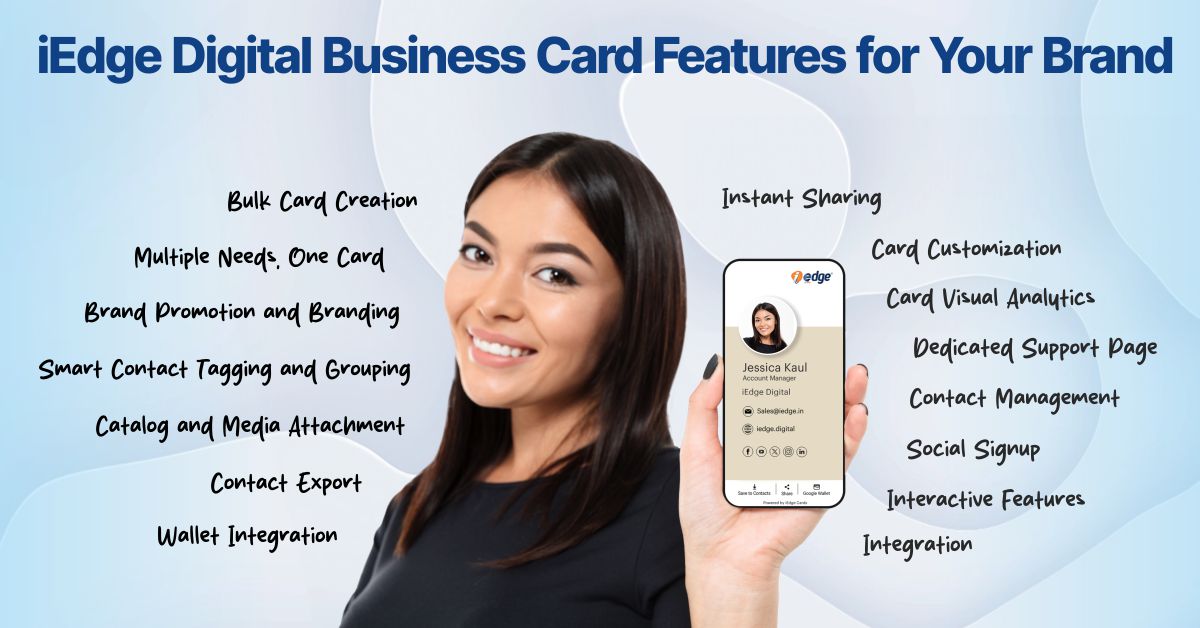
Digital Business Card Features for Your Brand
Here is the list of top iEdge digital business card features that support your business operations and brand growth. We have explained every feature clearly, so you understand its importance for your brand.
1. Bulk Card Creation
Large teams require digital cards to access quickly. However, individual card creation (one by one) takes time. iEdge has a bulk card creation that eases these operations and lets you create hundreds of cards in minutes.
You can upload a spreadsheet with names, images, contact details, and other details, and the system will generate digital cards instantly. This feature supports onboarding and team expansion.
Additionally, this feature lets you update entire department cards at once. A brand that has multiple departments and hires new talent every now and then can use this feature to bulk-create digital cards efficiently.
It also helps maintain branding consistency. So, every card follows the preset format, theme, and layout. This ensures that your team gets a clean and professional look across all touchpoints. Learn how affordable digital business cards are for startups.


2. Multiple Needs, One Card
iEdge is not just a contact card but a central hub. It can store your identity, brand identity, phone number, catalog, website, social profiles, email, office address, office location, portfolio, and listing in a single place.
This makes you organized and clean, as you don’t need to share multiple links with the client; just the digital card link is enough, as it carries everything. The card works for meetings, open houses, interviews, online networking, and conferences.
This helps your team maintain a clear and organized way to share information. Additionally, it positions your brand as modern, progressive, and well prepared.
3. Brand Promotion and Branding
Your every interaction with a prospect is an opportunity to represent your brand. At iEdge, we understand this, and that’s why our cards support brand colors, logos, and design styles. This helps you highlight your credibility and values. So, when your team shares them with prospects, they can see your brand identity.
Brand-forward design helps build and improve trust. Additionally, it helps them remember your brand. It gives your team a strong sense of ownership because every card carries your brand personality.
This also helps with long-term recognition. When your cards get saved or shared forward, your brand keeps growing with every interaction. Understand how to boost personal branding with personal business cards.

4. Instant Sharing
A smart digital card should be quick. iEdge gives you the flexibility and swiftness you need; share it with anyone in multiple ways. You can send a link through text, share the QR code, or tap the NFC card for contactless sharing.
This aids during meetings, conferences, or events where fast sharing matters. The QR code works even if the other person has weak mobile network coverage. The NFC option helps your team share their details with a tap, which feels smooth, quick, and impressive.
Sharing flexibility makes the card useful for all types of interactions. Whether your team meets someone offline or online, the card stays ready.
5. Contact Export
Contact storage should be simple. iEdge supports simple contact export in an Excel file to your phone storage, which you can integrate with your CRM. This also helps you keep the lead database updated without manual copy-paste work.
Your team can collect leads at events, open houses, or networking meetings and export them later for follow-up campaigns. This improves productivity and reduces errors. It also helps top executives track how many contacts their team collects over time.

6. Catalog and Media Attachment
iEdge lets you showcase your brand, product, or service portfolio and media content. Your team can attach projects, videos, brochures, images, etc., to give prospects a clear view of your offerings.
Clients can open media directly from the card without searching through emails or messages. This simplifies the decision process. It also helps your brand present information in a neat and organized way.
Study everything about metal digital business cards.
7. Wallet Integration
iEdge cards support wallet integrations like Apple Wallet and Google Wallet. This allows users to store the card on their mobile device with one tap. Additionally, it helps clients access your details whenever they need them.
Wallet integration further improves brand visibility. Prospects do not lose your card in message lists or email folders. For executives and agents who meet many clients in a day, this feature helps maintain long-term recall. .

8. Card Customization
Different teams have different needs. With iEdge, you can customize the card layout, sections, buttons, icons, and colors. With iEdge, you can personalize the user experience while keeping the brand theme intact.
Some team members want to highlight marketing achievements, some sales, and so on. This customization helps individuals present their strengths while staying under the same brand umbrella. Overall, this assists your entire team in maintaining a clean, professional, and attractive digital presence.
9. Smart Contact Tagging and Grouping
Your brand can handle multiple types of contacts. These can be buyers, sellers, investors, partners, etc. iEdge supports smart contact tagging and grouping to help your team stay organized.
When a contact is added through your card, it can move to a specific group. This helps during follow-ups and campaign planning. It also helps managers track the kind of leads their agents bring in. It removes confusion and supports faster decision-making.
Find out everything about the NFC digital business card. .

10. Card Visual Analytics
Analytics help brands understand engagement. iEdge card dashboard presents visual analytics that show card views, shares, and link clicks. This helps your team identify how well a card performs.
Your team members can track these insights, like which card receives the most card interactions, or which links get the most clicks. These insights help them decide on a better strategy for the future. Additionally, analytics also helps you study client behavior and see what prospects find important and what they avoid.
11. Dedicated Support Page
Clients often prefer direct access to support. iEdge cards include a dedicated support page link that helps clients submit queries to reach the right representative. This improves trust and helps your brand present a professional support system.
It further saves time because clients reach the correct department without confusion. Support pages also help you respond faster to urgent requests. .


12. Contact Management
Managing contacts is one of the most important challenges for real estate agencies. iEdge makes this process simple. You can save, filter, group, and update contacts inside the system. Your team can access their contact list anytime, anywhere.
You can also update client details when required. This supports better communication and helps in smooth workflow management. The system helps create a clean database that supports long-term growth.
Discover the different use cases of digital business cards for different industries.
13. Social Signup
iEdge supports convenient signup with your social profiles, like LinkedIn and Gmail, for quick registration. Your team can sign in through their social account or corporate account with just an OTP. This saves time and helps teams access their cards instantly.
Additionally, it reduces login errors, along with improving user experience, especially for large teams that want fast onboarding. .

14. Interactive Features
Clients always look for interactive and wholesome digital experiences. iEdge cards support interactive buttons, clickable icons, maps, call options, and message links. These tools help prospects take action without searching for details.
An interactive card improves client engagement. Also, it saves time for team members because prospects can reach out with one click. This supports faster responses and stronger communication.
15. Integration
Business tools work better when connected. iEdge delivers integration options with CRM systems, marketing tools, email platforms, HRMS, and automation workflows. This helps brands move contacts smoothly into their existing system.
You can track follow-ups, assign leads, and push contacts into campaigns. This supports internal alignment and better results. Integration further helps your digital card work as part of your entire tech setup.
Learn how electronic business cards improve catalog distribution. .

Conclusion
Your brand needs smart networking tools to stay competitive in this tech-driven world. iEdge gives you the right features to support this goal. From bulk creation to card analytics, each feature helps your team work faster and more confidently.
These digital business card features also support your brand image and client experience. This tool saves time, builds trust, and strengthens communication. It helps your team members stay ready for every meeting. It also helps your brand stay active across all digital platforms.
If you want to improve engagement and build a strong presence, iEdge offers the right digital business card to support growth. Now you know how to use a digital business card to support your brand and build client connections.
These features are not optional, but mandatory. These must-have digital business card features for modern business success, when used correctly, can help your mobile business card become the fastest way to connect, share, and grow.
FAQs
Digital business cards are also called smart business cards, digital visiting cards, digital contact cards, personal digital cards, personal branding cards, and more. Digital business card names can vary based on the users’ needs, purpose, and industry they serve.
Digital business cards offer many benefits for a brand, like easy contact sharing, brand promotion, contact management, social media integration, branding, and many other benefits. Overall, iEdge digital business cards are one solution for all your networking needs.
A digital business card features entirely depend on your requirements. However, some common features like card customization, easy sharing, contact management, department-wise information display, card redirection, file attachment, media attachment, card visual analytics, bottom navigation bar, wallet integration, and a few others.
A digital business card is a digital version of a traditional card that exists in electronic form and is typically used for networking. It carries all your contact details, brand color, logos, and more. It has a dashboard from which you can manage all your data. You can share it using QR codes, links, and NFC taps.
The main difference between a digital business card and a physical card is that a digital card offers multiple sharing options and can carry all your details in a single card. On the other hand, physical cards can only carry a limited number of details.